

Ask a CIO about putting an AI assistant inside one of their business applications, and the first questions are rarely about what it could do. They are:
- Can it see data it shouldn’t?
- Where does our data go?
- What will it cost, and can it run away?
We wanted answers backed by code, not slides, so we built an assistant into TempHire, our open-source reference application. TempHire is a staffing company’s line-of-business application: people, their addresses, phone numbers, rates, skills and work history, searched in a grid and edited in a form. The assistant is called Quinn. Users ask it questions in plain language, such as “Who knows SQL?”, “How many people do we have in each state?” or “Who has worked as a project manager?”, and get answers with lists and tables. The people Quinn mentions are links that open their record.
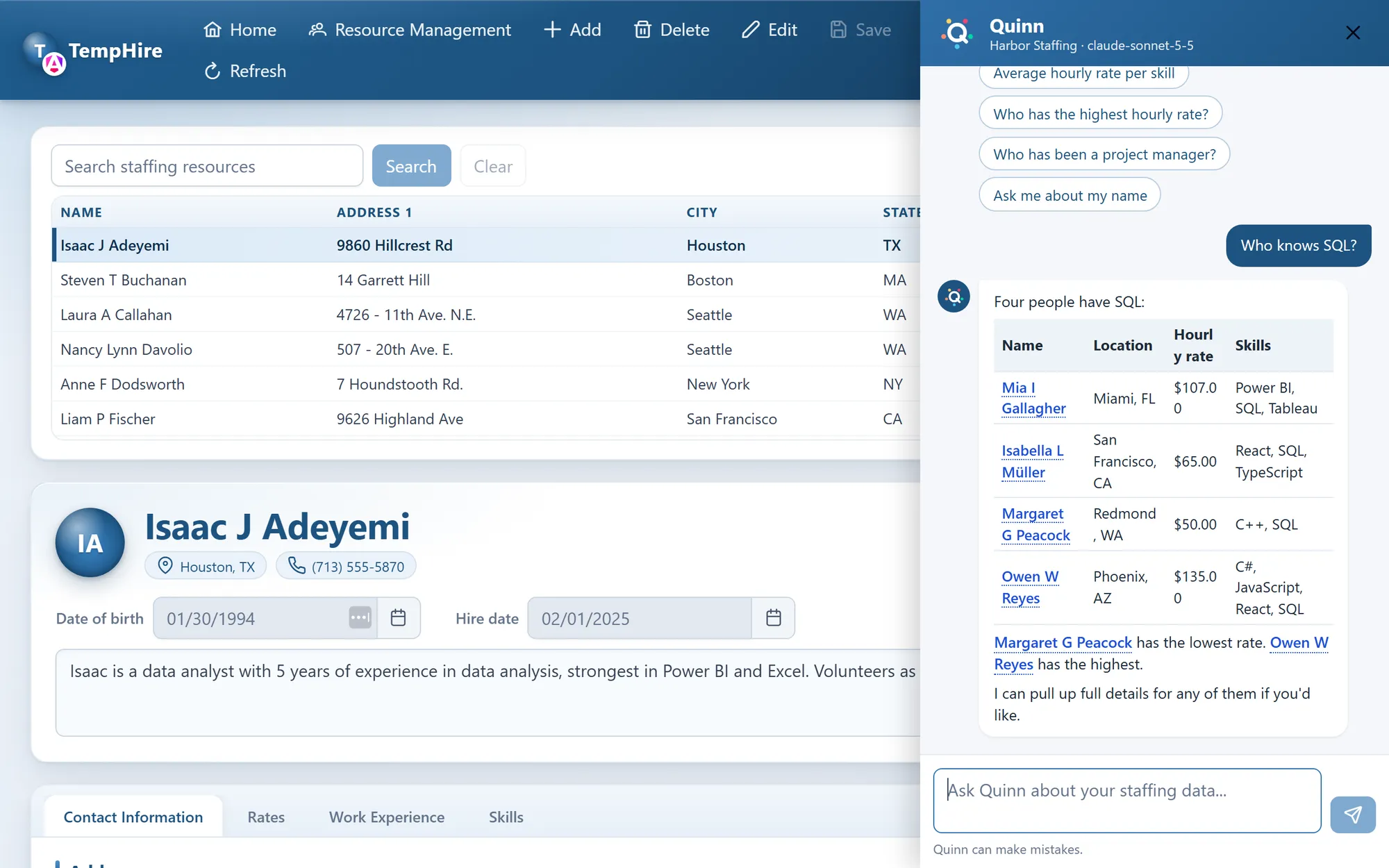
Quinn in TempHire, answering “Who knows SQL?” with Claude. Each name links to that person’s record.
Everything below is in the code, and the server’s documentation explains each piece in more depth. The application is built on Angular (there is also a React version), Breeze and ASP.NET Core, but the approach doesn’t depend on that stack.
1. Can it see data it shouldn’t?
The common mistake is to give the AI model a database connection, or a service account, and then tell it in the prompt which data it may use. A prompt is a request, not a rule. A model can misread it, and a cleverly worded question can talk it out of it.
So Quinn follows a simpler principle: the assistant is the user, not a super-user.
- The model never touches the data. It can only ask for tools to be run, such as “search people by skill” or “show one person’s work history”. The tools are served by an MCP server inside the application, and they are read-only.
- The tools run as the signed-in user. When Quinn calls its MCP server, it passes along the user’s own access token. The tools run with that user’s identity and company, exactly as if the user had searched for themselves.
- The tools use the application’s own data access. TempHire serves several companies from one database, and every query is filtered to the user’s company in one place, below everything else. Quinn’s tools go through that same filter. None of them mentions the company, so none of them can get it wrong. Whatever the model asks for, it gets only what the user could have seen anyway.
- Tokens are issued for named resources. The application’s main API and the MCP endpoint each accept only tokens meant for them, so a token handed to an outside AI tool for the MCP server can’t be used to call the main API.
- Links come from data, not from the model. The model doesn’t write links. The server tells the client which people the tools actually returned, and the client links only those names. If the model gets a name wrong, or makes one up, it stays plain text: it never becomes a link to someone’s record.
Your application’s rules may look different: roles, departments, row-level security in the database, or a tenant per customer. The principle is the same. Put the rules below the AI, in the data access the rest of the application already trusts, and make the assistant go through it as the user. Then the question “can the AI see data it shouldn’t?” has the same answer as “can the user?”
2. Where does our data go? Choosing a model
Quinn can run on two kinds of model, and switching between them is a configuration change. Both get the same instructions, the same tools and the same data.
- A model on your own servers. TempHire runs Ollama with a small open model,
qwen3:4b-instruct, which fits on a laptop’s graphics card. Nothing leaves your network, and there is no per-question cost. - A hosted model, such as Anthropic’s Claude. The questions, and the data the tools return, go to the provider, under their data-handling terms.
The honest part is the difference in quality. We asked both “Who has the Test skill?” (two people have it):
- The small local model found them in about three tries out of four. The rest of the time it answered that it had no information about a “Test” skill without looking it up, or used the wrong tool and stopped there. Better instructions took it from none of three tries to most, and that is about as far as wording gets a model this size.
- Claude called the search tool straight away and named both people.
A larger local model narrows the gap, if your hardware can hold it. So the decision isn’t technical first: it’s about your data. If it can’t leave your network, run the model there and size the hardware for it. If it can, a hosted model gives better answers for less effort. Either way, you can prototype on one and switch later without rewriting anything.
3. What will it cost, and can it run away?
A hosted model charges by the token, and an assistant sends more than people expect. Every call to the model sends the instructions, the tool definitions and the conversation so far, and a question takes at least two calls: one to decide which tool to run, one to answer with its results.
In TempHire, a typical question is about 5,400 tokens over two model calls, 95% of them input. With Claude Sonnet 5.5 at $2 per million input tokens and $10 per million output tokens, that is about $0.013 a question at full price.
Prompt caching cuts that substantially. The parts of a request that the previous one also sent, such as the instructions and tool definitions, are read from the provider’s cache at a twentieth of the input price. Measured in the application:
| Question | Cost | At full input price |
|---|---|---|
| “Who knows SQL?”, nothing cached yet | $0.0103 | $0.0134 |
| The same question again within five minutes | $0.0035 | $0.0133 |
| A follow-up: “Which of them has the highest rate?” | $0.0049 | $0.0139 |
Cheap per question still isn’t a budget, so Quinn has budgets in dollars: for each user and each company, per day, week and month, for each model. As shipped:
| Daily | Weekly | Monthly | |
|---|---|---|---|
| Each user | $0.50 | $1.25 | $3.00 |
| Each company | $1.50 | $4.00 | $10.00 |
Even at the uncached price, that is about 38 questions a day per user and about 770 a month per company; with caching, two to three times as many. The company’s monthly limit is the real budget. The others keep one user, or one busy day, from using all of it.
A few details make budgets work in practice:
- Every answer is counted, however it ends: finished, failed or cancelled. The cost is stored with the prices of that moment, so a later price change doesn’t rewrite the past.
- Users can see where they stand, on a usage page, and a used-up budget gets a plain answer instead of an error: “You’ve used up your daily Quinn allowance ($0.50). You can ask again in 6 hours and 41 minutes, when it starts over at midnight UTC.”
- The local model is free, so it has no limits, but its usage is still counted and shown, in tokens.
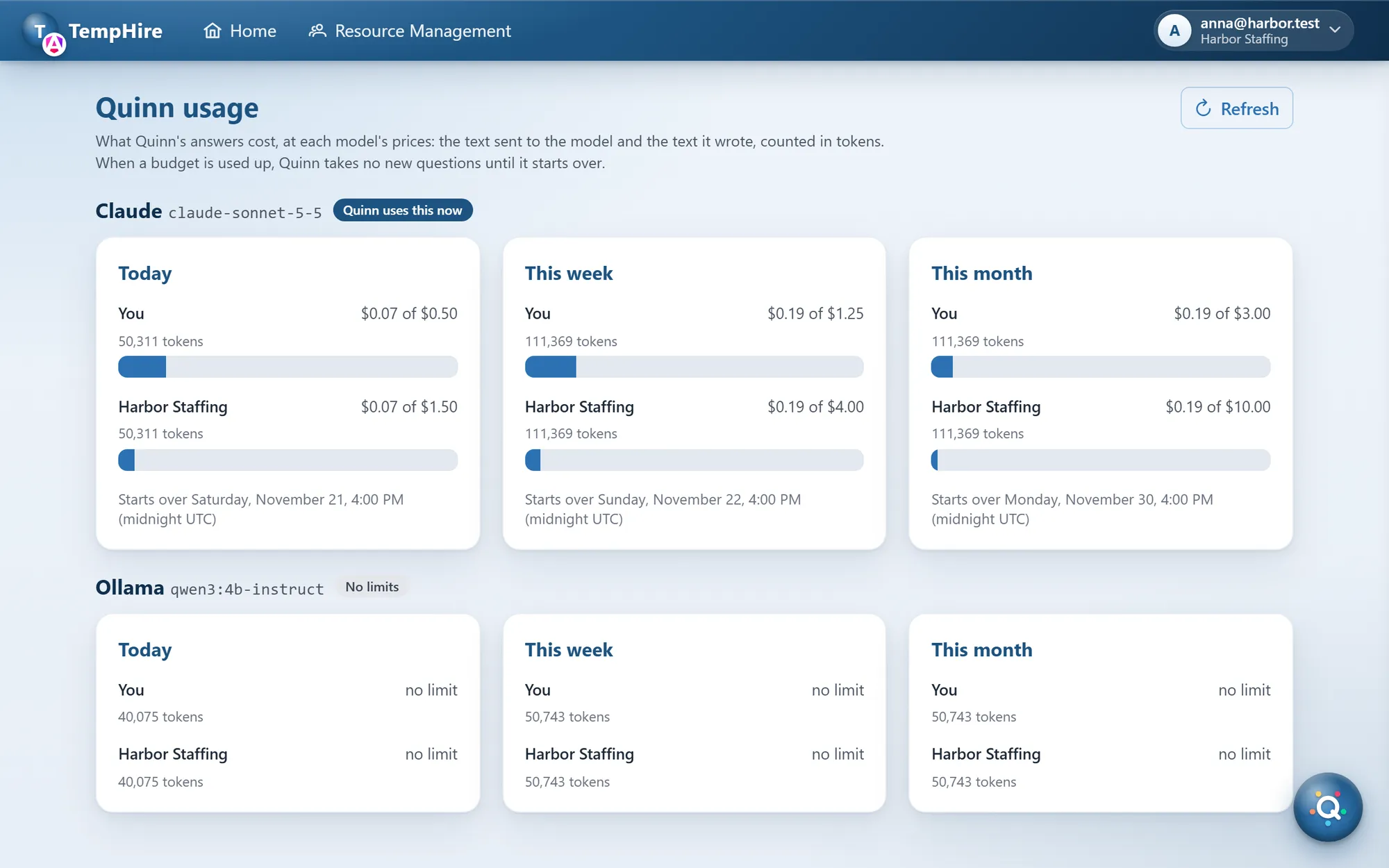
The usage page: spending against each budget for the hosted model, and tokens only for the free local one.
Put budgets in from the first day, even generous ones. They turn “what will this cost?” from a worry into a setting.
4. Open standards, so the work isn’t locked in
Quinn’s tools sit behind a standard MCP server, and the application signs users in with standard OAuth 2.1. That has a useful side effect: other AI tools can use the same tools. A developer can connect Claude Code to TempHire’s MCP server, sign in as themselves, and ask the same questions, under the same permissions. The investment in good tools isn’t tied to one chat pane or one vendor.
What this means for your application
You don’t need a new application, or a new technology stack, to do this. What it takes:
- A way to run queries as the signed-in user, through the data access and rules your application already has. This is the part that decides whether the assistant is safe, and the part most worth getting right.
- A small set of read-only tools that answer the questions your users actually ask. A handful is enough to start.
- An endpoint on your server that runs the conversation with the model, counts usage and enforces budgets.
- A decision about the model, driven by where your data may go.
If your application is older, you can still start here: an assistant doesn’t have to wait for a modernization. And if a modernization is coming anyway, it’s a good moment to put the data rules where both the application and an assistant can rely on them.
All of TempHire’s code is open source: the Angular version, the React version and the server they share. If you’d like an assistant like this in your own application, we’d be glad to talk.